Zero-Click Searches Hit 60%—Here’s How to Turn “Lost” Clicks into Leads

Growth Strategy | Strategic Partnerships | Sales & Alliances

Introduction: What “zero-click” really means
A zero-click search happens when someone searches on Google and gets the answer without visiting any website. The result page shows the answer at the top, inside a box or panel. The person reads it and moves on. No click. No visit to your site.
Today, most searches end like this. If zero-click searches are around 60%, it means more than half of your potential visitors are getting answers on Google itself. If your business depends on organic traffic, that can feel scary. But here is the good news: you can still win leads, even when clicks drop. You can shape what people see on the results page, guide quick actions like calls or bookings, and grow brand demand that pays off later.
Key takeaways:
- Zero-click is normal. Plan for it.
- Answer first, then offer one next step.
- Win featured snippets, PAA, map packs, videos, and image packs.
- Treat GBP as a core lead channel.
- Build free tools and mini-studies that spread your name.
- Shift KPIs from sessions to calls, messages, bookings, and signups.
- Use a steady brand hook so people remember you later.
What counts as a zero-click search?
Here are common search types where people do not click:
- Short facts: weather, time, age, dates, definitions
- Quick math: currency conversion, calculator, unit conversion
- Local info: “plumber near me,” “coffee shop,” “directions”
- Brand facts: “Apple revenue,” “CEO of…,” “founder of…”
- How-to basics: “tie a tie,” “boil eggs,” “restart iPhone”
- Products: price, availability, rating, “in stock near me”
- Medical basics: symptoms, first steps, safety notes
Google shows answers in featured snippets, People Also Ask boxes, knowledge panels, map packs, image packs, video previews, and now AI-style summaries. These give fast answers and reduce the need to click through.
Why zero-click searches keep growing
- Google shows more answer boxes
Google wants to help users finish tasks fast. So it builds result types that show answers on the page. That includes short text boxes, lists, tables, videos, and maps.
- Mobile habits
On phones, speed matters. People want the answer in one scroll. A tap is extra effort. If the answer is right there, they stop.
- Voice and assistants
Voice results must be short. The speaker reads one answer. No click happens. Over time, this trains users to expect instant answers.
- Local intent
Local searches often end with a call, message, or directions from the result page. A website visit is not required.
- AI-style summaries
New AI summaries combine facts from many sites and show a blended answer. Users scan and leave. Again, no click.
What this shift means for your business
- Lower CTR on many queries. You may see rising impressions in Search Console, but clicks stay flat or fall.
- Shorter journeys on Google. People call from the result page, request a quote, or check directions without opening your site.
- Old KPIs mislead. Pure traffic targets do not tell the full story. Leads can still grow even if sessions drop.
- Winners still win. Brands that design content for these result types gain reach, trust, and direct actions like calls and bookings.
- Brand recall matters more. If users see your name at the top answer again and again, they remember you and search for you later.
Cloudflare CEO on the rise of ‘zero-click searches’
The new mindset: “Answer fast, then guide the next step”
To win in a zero-click world, think like this:
- Give the answer in a clear, short form that fits a snippet.
- Attach a next step: call, message, booking, tool, calculator, checklist, sample, demo.
- Make your brand visible inside that answer.
- Show proof: reviews, ratings, photos, and credentials.
- Measure actions, not only visits: calls, messages, bookings, leads, store visits.
How to measure zero-click impact (so you can manage it)
- Google Search Console
Track impressions vs clicks and CTR for your top queries. If impressions climb but clicks fall, you are in a zero-click area. That is normal. You now need to watch new actions.
- Google Business Profile (GBP) insights
Watch calls, messages, bookings, direction requests, and website clicks. These are the on-SERP actions that replace many site visits for local and service brands.
- GA4 events
Track call clicks, contact clicks, copy-to-clipboard, scroll depth, calculator use, tool usage, and lead form submits. Tie them back to search where possible.
- Simple SERP review
Search your main queries and take screenshots. Note which result types show up. Mark which ones you can win (snippet, PAA, map, images, video). Repeat monthly.
---
Strategy 1: Win featured snippets with simple answer blocks
Featured snippets reward clear answers. Answer first, in a 40–60 word block. Use simple language. Then expand below for those who click.
Formats that work:
- Paragraph for definitions and short “what/why/how”
- Numbered list for steps and processes
- Bulleted list for tips and options
- Table for comparisons (price, plan, size, specs)
Steps:
- Pick 50–100 questions you want to rank for.
- Add a short answer block near the top of each page.
- Use the exact question as a sub-heading.
- Keep the answer plain and specific.
- Add detail below the short block for readers who click.
- Track which pages gain snippets and refine the format.
Tip: Avoid fluffy intros above your answer block. Google wants the answer fast.
Strategy 2: Fill “People Also Ask” with Q&A sections
“People Also Ask” shows related questions. Each item clicks open. If your page answers those questions in a clear way, you can appear there again and again.
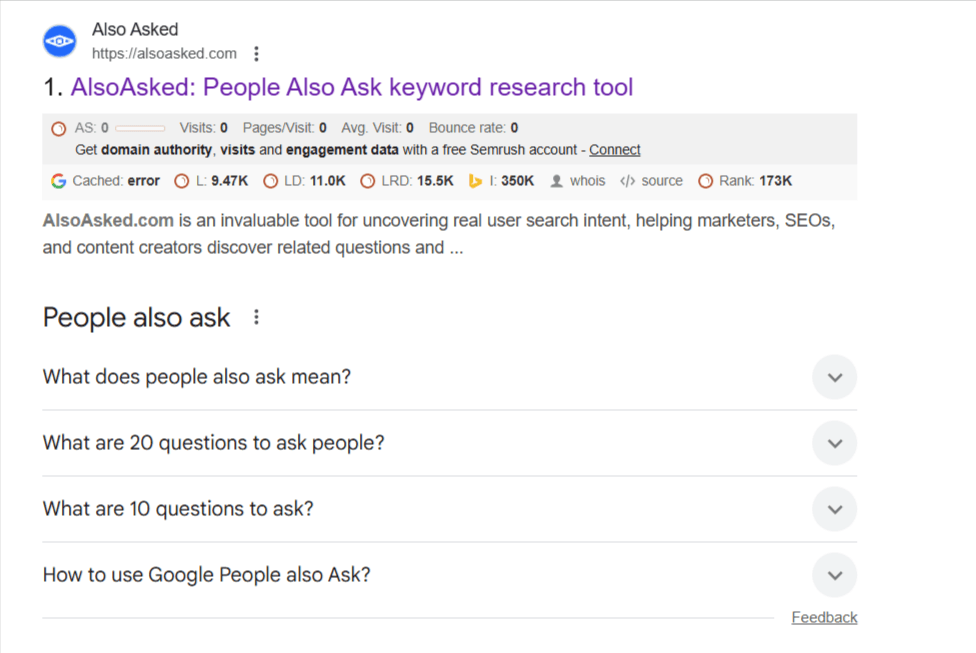
Steps:
- Collect 10–20 common questions per topic.
- Create a Q&A section on the page with each question as an H3/H4.
- Answer each in 2–4 short lines.
- Use simple words and direct sentences.
- Link to deeper guides from each Q&A when helpful.
This builds reach, even if clicks are fewer. Your name shows up often. That builds trust and later direct searches.
---
Strategy 3: Use a schema that feeds rich results (FAQ, HowTo, Product)
Schema (structured data) helps Google understand your page and show rich results.
- FAQPage for question-and-answer content
- HowTo for step-by-step guides with materials and steps
- Product for price, availability, rating, brand, SKU
- Organization for brand name, logo, sameAs links
- LocalBusiness for address, phone, hours, menu/service list
- VideoObject for title, description, duration, timestamps
- Sitelinks Search Box for brand search on your site
Keep markup clean and accurate. If the content changes, update the schema.
Strategy 4: Turn Google Business Profile into a lead engine (for services and local)
Your Google Business Profile often is your new home page for local intent. Many actions happen right there.
Checklist:
- Set correct categories and service areas
- Add services, products, and pricing ranges where possible
- Write a clear business description with your core value
- Post weekly offers, updates, and before-and-after photos
- Turn on Messages and reply fast
- Add booking or quote links if you use a partner app
- Seed your Q&A with real questions and helpful answers
- Ask happy customers for reviews and respond to each one
- Add UTM to your website link so you can track traffic from GBP
- Keep hours, holiday hours, and photos fresh
When someone searches “near me,” they can call, message, or book without visiting your site. That is a win. Treat it like a core channel.
Strategy 5: Own the Map Pack with local proof
Map Pack ranks by relevance, distance, and prominence. You cannot control distance, but you can build relevance and prominence.
- Keep name, address, phone consistent across the web
- Add service pages for each key location or area
- Earn local reviews with service details in the text
- Upload real photos of work, staff, and space
- List on top local directories
- Use local keywords in titles and headings (but keep it natural)
More proof means more Map Pack wins, which means more calls and direction requests—no site visit needed to become a lead.
Strategy 6: Make videos that answer and include clear chapters
Google shows video previews for many “how-to” and “review” queries. If your video answers the question fast and has chapters (timestamps), it can show the exact part that helps the user.
Steps:
- Create a short video that solves one task.
- Add timestamps for each step in the video description.
- Use a simple title like “How to replace a kitchen tap in 5 steps.”
- Add your brand line in the first sentence of the description.
- Embed the video on your page with the same steps in text.
This builds reach on YouTube and Google, and it moves people to your brand even if they do not click right away.
Strategy 7: Build one-screen, answer-first pages
If a user does click, keep them. Put the answer at the top, an action button next to it, and the proof nearby.
A good fold looks like this:
- H1 that matches the query
- Short answer block (40–60 words)
- Primary CTA: “Get a quote,” “Call now,” “Try the tool,” “Download”
- Proof: stars, badges, logos, short testimonial
- Quick links to deeper sections: pricing, steps, FAQs, examples
This layout reduces bounce and raises conversions, even with fewer visitors.
---
Strategy 8: Create free tools that solve the task on the spot
If the search is “calculator,” “checker,” or “template,” build a free tool on your site. People love tools that save time. Tools get links. Tools win snippets. Tools plant your brand in the user’s mind.
Ideas by industry:
- SEO: title tag counter, schema generator, FAQ builder
- E-commerce: size guide, fit finder, paint coverage calculator
- Services: cost estimator, time-to-fix checker, quote range finder
- B2B: ROI calculator, risk score, readiness checklist
Add a clear next step next to the tool: email capture, save result, or book a consult.
---
Strategy 9: Publish short research that gets cited
Original stats get picked up by the media and blogs. Those mentions help you show up in answer boxes and summaries.
Keep it simple:
- Run a small survey (100–300 responses)
- Share 5–10 clear findings with simple charts
- Add one page with the raw numbers and methods
- Use clean headings that match common questions
You become the “source” others cite. Even if the click is not always yours, your name spreads and brand searches go up.
---
Strategy 10: Use clear, honest meta titles and descriptions
Yes, many users will not click. But for those who do, a clear title and description still matter.
- Title: Say what it is and who it helps
- Description: state one benefit and one action
- Avoid cute lines. Be direct.
- Keep your site name and favicon clean so your brand is easy to spot
This increases the chance that the right people click and convert.
---
Strategy 11: Shift KPIs from “only traffic” to “actions and leads”
Track:
- Calls from GBP and mobile pages
- Messages and quote requests
- Bookings and appointments start
- Email signups and tool usage
- Store visits (if you use that tracking)
- Brand searches over time
- Reviews gained per month
When leaders see these numbers, the “traffic drop” fear fades. You show real demand and revenue impact.
---
Strategy 12: Build brand memory with a simple hook
In a zero-click world, people might see your brand name, but not visit. Make that moment count.
- Use a short brand hook (3–6 words) that says your edge.
- Repeat it in your snippet-friendly answers, videos, and descriptions.
- Keep it the same everywhere: site, GBP, YouTube, socials.
When they need help later, they remember that line and search for you by name.
The “Answer + Action” content pattern (use this on every page)
- State the answer in 40–60 words at the top.
- Offer one action beside it (button): call, quote, download, tool.
- Show proof: rating snippet, logo row, fast trust element.
- Expand: steps, options, examples, risks, and when to call a pro.
- Close with a low-friction CTA: free sample, estimate, or trial.
This pattern fits both the zero-click world and real human needs.
Quick wins you can ship this week
- Add answer blocks to your top 15 pages.
- Turn on Messages and add two Q&As to GBP.
- Create one FAQ section on your highest-value page.
- Record a 2-minute video that solves one task; add chapters.
- Add UTM tags to your GBP website link to track results.
- Ask for five new reviews from happy customers.
- Build a simple calculator or checker in your main category.
Common mistakes to avoid
- Fluffy openings that hide the answer below the fold
- Walls of text with no short summary block
- Random schema that does not match on-page content
- Out-of-date GBP details (hours, photos, services)
- No action near the answer (no button, no next step)
- Measuring only sessions and ignoring calls or bookings
- Changing your brand hook every month (keep it steady)
Conclusion: You can win in a zero-click world
Zero-click is not the end of organic growth. It is a shift in where the value shows up. People still need help. They still spend money. They just take more actions on the results page. If you answer clearly, show proof, and add one smart next step, you will turn “lost” clicks into calls, messages, bookings, tool uses, and signups.
Make your content easy to scan. Put the answer first. Treat your Google Business Profile like a landing page. Build small tools that solve the task. Publish one simple study each quarter. Track actions, not only visits. Tie all of it to a steady brand hook people remember.
Do this, and you will see fewer clicks—but more leads.
Want
Organic Traffic from Google and AI Models?
Tap on 5 questions
(takes 15 seconds) and get a measurable growth plan
Read more Guides
Zero-Click Searches Hit 60%—Here’s How to Turn “Lost” Clicks into Leads
Zero-click is not the end of organic growth. It is a shift in where the value shows up. People still need help. They still spend money.